Monday, July 25, 2011

Card Discussion - Photon Shockwave - Part 1

For each part of these reviews, I will do 3 cards per part, so that I can elaborate on each card a bit more than just doing a quick glance when doing 5 or more cards. At least, it'll give you more of an idea on what I'm thinking about when doing these cards, and in some cases, it'll give me an urge to make a deck on the principle I presented.

For now, let's talk about these cards: (The cards shown below are from Shriek, so if you want to read through the set, go here.)

Triwight Zone
[Normal Spell Card]
Activate by selecting 3 Level 2 or lower Normal Monsters in your Graveyard. Special Summon the selected monsters from the Graveyard.

The decks that I can see benefitting this card are "Law of the Normal" decks, Ojama decks, Skull Servant decks, and Gemini decks. The Skull Servant choice and the Gemini choice isn't as common as people might think, but it is plausable. For Gemini decks, you can Special Summon Gemini Soldier, which can lead you into  Special Summoning another Level 4 or lower Gemini monster. The Skull Servant deck, on the other hand, if you Special Summon those Skull Servants off Triwight Zone, you can Xyz Summon into Baby Tragon, and have the King of Skull Servants make a direct attack.

Just a few thoughts on it.

Evangelist of the Ice Boundary
WATER     **
[Aqua/Effect]
If you control a face-up "Ice Boundary" monster, you can Special Summon this card from your Hand. During the turn you Special Summon with this effect, you cannot Special Summon Level 5 or higher monster(s). Also, you can Release this card to select and Special Summon 1 "Ice Boundary" monster in your Graveyard other than "Evangelist of the Ice Boundary".
ATK: 1000      DEF: 400

Perfect for Ice Barriers. (Obviously, Ice Boundary in OCG means Ice Barriers in the TCG) The first effect allows the Ice Barrier monsters that need another Ice Barrier to work properly. The second effect can be used to bring out a monster from the Graveyard that you can't typically Summon, but in accordance to the first effect, you cannot do both effects on the same turn.

...Maybe through some Special Summoning means (Not like Graceful Revival and Limit Rebirth, as an example), I may be able to utilize this effect to the best of the ability. I'll work on a deck to test this theory.

Tyrant's Desperation
[Continuous Trap Card]
Activate by Releasing 2 Non-Token Normal Monster you control. While this card is on the Field, neither player can Normal Summon or Special Summon monsters.

Rescue Rabbit and Triwight Zone fills this releasing requirement fast. It'll seem a bit good against some decks, but not all of them. Good side deck card, nonetheless.

Saturday, July 23, 2011

Jurracs (1)

3x Jurrac Aeolo
3x Jurrac Dino
3x Jurrac Guaiba
2x Jurrac Herra
3x Jurrac Monoloph
2x Jurrac Stauriko
3x Jurrac Velo

3x Battle Tuned
Card Destruction
3x Fossil Dig
Monster Reborn
3x Rekindling

Call of the Haunted
2x Flamvell Counter
3x Seven Tools of the Bandit
Solemn Judgment
2x Solemn Warning
Torrential Tribute

Extra Deck

2x Armory Arm
Black Rose Dragon
Brionac, Dragon of the Ice Barrier
Iron Chain Dragon
Jurrac Giganoto
2x Jurrac Meteor
2x Jurrac Velphito
2x Stardust Dragon
3x Evolkaiser Ragia

The reason why I put in Battle Tuned is because if I need the boost, I would be able to boost my monsters when they are in danger of being destroyed. Anyway, thoughts, rate, fix, discuss, or comment. Enjoy.

Thursday, July 21, 2011

Game Tutorial - Cardfight Capital

For anyone that missed the Game Analysis (Obviously, everyone did, because I posted the Game Analysis at the exact same time I put up the Game Tutorial.), go here: http://dangerascend.blogspot.com/2011/07/game-analysis-cardfight-capital.html


Maps:
Shop Handsome

Card Capital


These are the two maps shown in Cardfight Capital. So, when you log in, you'll show up at the door of Cardfight Capital, but do not block the spawn point, otherwise you will be booted out of the game. With this being said, in either map, the entire map is shown, so when you move, it will not scroll, showing you in the middle of the screen, so I recommend keeping an eye on your icon, while you use the arrow keys to move.

Specifics on the Buttons:
The specific of the buttons on the top right of the map do stuff shown below when you click them:

  • The question mark button: It is the help window. When you click on it, it goes to the help screen where it gives you different links to different windows that you can check, so that you are provided help without asking questions in world chat of Cardfight Capital.
  • The map button: This button allows you to change maps between Shop Handsome and Card Capital. The spawn point is typically Card Capital, but if a map gets crowded, you can go to a different map to do a Cardfight.
  • The "face" button: The button is Game Options. It allows you to change your name, check/uncheck if you do not want to listen to the sound of Cardfight Capital up to a certain point, check/uncheck if you want random people to challenge you, and check/uncheck if you want your window to flash when you are being challenged. Also, this is the button where you can change your icon to whoever you wish that they have available at the time.
  • The back of the Cardfight!! Vanguard card button: When you click this button, it'll give you access to the Deck Editor. More will be explained later in this post.
  • The multiple Deck Boxes button: This is where you pick your Deck you wish to Cardfight with.
  • The "eyes" button: This is where you can watch Cardfights of other players, when you click the button. Do not be rude to whoever's playing and distract them.
  • The "sword" button: This button is used to challenge other players to Cardfights. Be respectful though and ask in worldchat "Cardfight, anyone?" and do not spam it constantly.
Deck Editor:

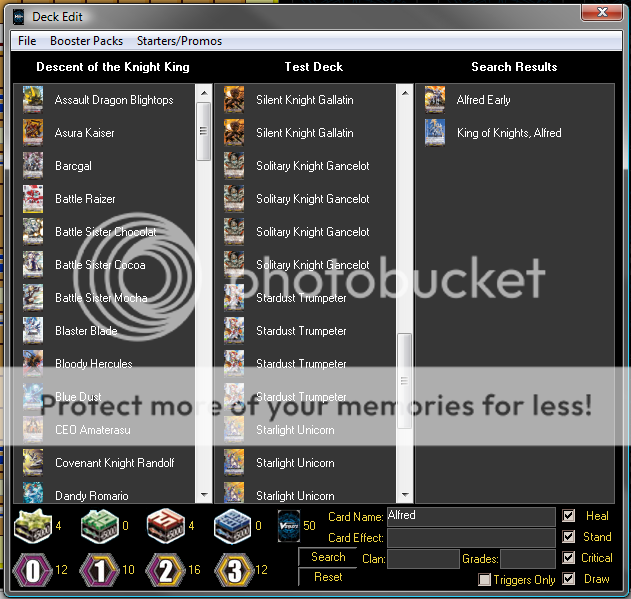
Please ignore the numbers in the deck editor of this picture. At the time, this picture was made, things were slightly different in Cardfight!! Vanguard.

Alright, time to elaborate here:

Card Name: This is where you can type out the name of the card and click the Search button to find it. Please note that some names I used from the Wikidot site is different in here. For example:

Rack Bird is Luck Bird in Cardfight Capital.
General Seyfried is General Zaifreet in Cardfight Capital.
Great Sage Baron is Great Sage Barron in Cardfight Capital.

Just a heads-up warning about that, and the examples listed is some of them, but I assure you that the majority of the card names on Wikidot are the same name in Cardfight Capital. Just different translations.

You can also search by Card Effect, Clan, Grade, and if it's a Trigger.

Under the "File" menu, there's New Deck, Open Deck, Save Deck, Delete Deck, and Pick a Deck to Use. In the other menus, you can pick a Booster Pack, Starter Deck (where it lists the cards that came from it only, not the deck itself), and Promos that Bushiroad releases (For example, their Card of the Day).

Controls during a Cardfight:


Always remember the Drag and Drop concept. Also, if you have no hand, and you are searching for a card to add from your Deck to your Hand, you do a SHIFT + Click.

Other Control Shortcuts:

Alright, I know this is posted in Cardfight Capital's help section, but if I overlook it, then others will overlook the shortcuts. So, I'm going to list them here, so it won't be overlooked, when someone reads this:

Used Anytime:
  • CTRL+Click on a card: Shows card information.
  • Shift+Alt+Click on a card: Shows card information (for Mac users).
Used in Deck Editor:
  • Click on a card: Shows card information.
  • Shift+Click on a card in the Set or Search tab: Adds card to Deck.
  • Shift+Click on a card in the Deck: Removes card from Deck.
  • Drag and Drop on a card from Set or Search tab to Deck: Adds card to Deck.
  • Drag and Drop on a card from Deck to anywhere else: Removes card from Deck.
Used in Cardfights:
  • Shift+Click on a card in the Hand: Calls unit as a Guardian.
  • Shift+Click on a card that's not in your Hand: Adds card to Hand.
  • Shift+Click on Deck: Drive Check
  • Ctrl+Click on Deck: Damage Check
  • Alt+Click on Deck, Drop, Soul Pile, or any Card Stack: Shows a list of cards.
  • Click on the player's battle face icon: Shows number of cards in hand.
  • Double Click on a card in play: Stand or Rest Unit. Flips facedown card up.
  • Double Click on a card in the Damage Zone: Flips or Unflips card.
  • Drag and Drop on a card from anywhere to Deck, Drop, Damage Zone, Guard Zone, Hand, or Circle: Moves card to desired destination.
  • Drag and Drop on a card from your Field to your opponent's Field: Declaring an attack on a Unit.
  • Drag and Drop from your Deck to your Drop Zone: Sends a number of your choice cards from the top of your Deck to your Drop Zone.
  • Shift + Drag and Drop from anywhere to Deck: Sends card to Deck, but the name would not be viewed by the opponent.
  • Ctrl+U: Stand all of your Units.
  • Ctrl+E: Declare turn end.
  • Ctrl+S: Shuffles your Deck.
  • Ctrl+T: View top card of your Deck, and return it to the top or bottom of your Deck.
  • Ctrl+R: You roll a dice.
  • Ctrl+L: Show a number of cards of your choice that you have last drawn to your opponent.
  • Alt+Q: Leave table or stop watching.
~~~

And with that, the Game Analysis and Tutorial is complete. I will be taking a break from Cardfight!! Vanguard for a couple of months, give or take a few weeks, when I feel up for it again. If I missed something, let me know. Also, if you have any questions, leave a comment.
  • Credit to the Duel Monsters Expert Administration for making this game, and all information in this post came from their game called Cardfight Capital.

Game Analysis - Cardfight Capital

It is about time I showed you what game I've been playing on for the past couple of months, getting all these decks prepared, and learning the basics of Cardfight!! Vanguard, so that you, the reader, learned how to play from it. The game is called Cardfight Capital, and I said in a previous comment that it's a BYOND game, so here's the link:


General Discussion:
Right now, the general discussion on Cardfight Capital can be listed in three categories:
  • League of Legends, which most of the players play to pass the time.
  • Yu-gi-oh!, which they rant on how the recent series are bad, and how Konami released too many broken cards so that more and more players joined Cardfight!! Vanguard. This occurs rarely, so don't expect to hear Yu-gi-oh! that often.
  • Cardfight!! Vanguard anime, where they discuss about the recent episode that just aired.
There's some other topics that players discuss about is being in a Team. Teams, in a way, are alright at times, but when everyone underneath the sun says "I want to join a team." and "Please, join this team. <insert URL of their team thread>", then the fandom made it less interesting to join teams.

Maps:
So far, there's two maps: Card Capital and Shop Handsome. I'll explain more in detail in the tutorial, since there's not much else to comment about them.

Gameplay:
If you noticed in the basics, I gave credit to the Duel Monsters Expert administration for the pictures. It's because that when you challenge someone, it shows up with that field, with two battle face icons, where it'll tell you how many cards in each player's hands by clicking on that said face icon. More will be explained in the tutorial.

Atmosphere:
Seems fairly positive. In regards to that, you can say that people play Cardfight!! Vanguard for the fun of the game itself, and not to be intended to win every single Cardfight. From what I noticed, the players seem to be a bit more positive since that they no longer play Yu-gi-oh!, a game where some people only intend to win. 


Other than the fandom of teams, the atmosphere is usually good.


~~~


To be blunt, if you are reading this and think this is a good game to play, play it and cast your opinion on it. "Sometimes, experiencing it first hand can lead to a good or bad decision on liking or disliking a game. What you like as a game may not apply to others."


~~~


Next up is the Game Tutorial.
  • Credit to the Duel Monsters Expert Administration for making this game. 

Monday, July 18, 2011

Cardfight!! Vanguard - Strategies I and II - Spike Brothers - Part 1

Picking out a Grade 0 Vanguard:
Pick Mecha Trainer. With his effect of being called to a Rear Guard Circle when you ride a Grade 1 Vanguard, but his ability to search out. In this case, most of the time, you will either search out Dudley Dan, Wonder Boy, or Cheer Girl, Marilyn.

Basic Strategy "Swarming":
You can guess that the basic strategy is swarming the field with their Grade 3s. The Main Vanguard that you should use is General Seifried, because when you Drive Check a Grade 3 while General Seifried is out in play, you can call that card to a Rear Guard Circle. With use of Juggernaut Maximum's Soul Blast, you can use his ability to return him to the deck, so that there's another target to call for General Seifried when he Drive Checks. Also, by using Sky Diver's skill, you can add Sky Diver to Soul to call another card out to the Rear Guard circle for another attack.

Also, with Dudley Dan's Counterblast, you can call out ANY card from your Deck by sending one card from your Hand to your Soul regardless of what Grade your Vanguard is, and if you decide to call Devil Summoner, you can check the next card from your Deck. If it's a Grade 1 or 2, you can call it to your Field. If not, it shuffles back into your Deck.

Guarding:
With 16 Grade 0 Shields (10000, unless it's a Draw Trigger, then it's 5000) and 10 Grade 1 Shields (5000), you can guard plenty of attacks; however, with you swarming a bit later in the game, this many Shields should cover you for the game. With Panzer Gail as an interceptor, it becomes a 10000 Shield, otherwise it becomes a 5000 Shield. The other 4 Grade 2 Interceptors are 5000 Shield, regardless if they are on the Field or in the Hand. With Cheer Girl, Marilyn, you can discard a card to block an attack completely.

Sample Deck List:

Grade 0:
4x Silence Joker
4x Sonic Breaker
4x Cheerful Lynx
4x Cheer Girl, Tiara
Mecha Trainer

Grade 1:
4x Dudley Dan
4x Cheer Girl, Marilyn
3x Wonder Boy
3x Spike Brothers Assault Squad

Grade 2:
4x Panzer Gail
4x Devil Summoner

Grade 3:
4x General Seifried
3x Juggernaut Maximum
4x Sky Diver

~~~

If you have any questions, leave a comment.

Sunday, July 17, 2011

Small Update

Anyway, I'm considering a few things, that I thought about, to give you guys something to look forwards to:
  • First thing, for Cardfight!! Vanguard Strategies, I will make a Spike Brothers deck, and explain how it works.
  • Next, I will do the Game Analysis of the Cardfight!! Vanguard game I've been playing. I may post the Game Tutorial near the exact same time as the Game Analysis, so that people won't get confused on how to play the game.
  • As for Cardfight!! Vanguard, I may take a break from it for a little while to rest my head; however, I'll be coming up with a solution on how am I going to set up the Hybrid Strategies portion. Please note, if a clan is incomplete, I may or may not overlook it. Just a heads-up.
  • Afterwards, I may switch to Yu-gi-oh! for a while.
  • Also, I may come up with an topic later on that may be of interest to some. 
A general comment:
  • If you have any questions on the Strategies, let me know immediately. I know that this section is a bit new, since Cardfight!! Vanguard is still a young game to be playing; however, if you are confused now, it's best to ask, so I can give a better clarification.

Friday, July 15, 2011

Cardfight!! Vanguard - Strategies - Royal Paladins - Part 3

Picking out a Grade 0 Vanguard:
Use Barcgal. With his effect to be called to your Rear Guard, you can utilize his other effect to call Flogal and Future Knight, Llew. With those effects, you can Superior Ride into Blaster Blade, and have your Soul ready for Soul Saver Dragon. Not to mention, other units of yours will be powered up using this method.

EDIT: This deck was made before Barkgal was banned from Starting Vanguard position in tournaments. If you want to find a Royal Paladin Deck that doesn't have Barkgal as Starting Vanguard, go to the Strategy II posts that I have made.

Basic Strategy "Soul":
With that being said, the main focus is using "put this card into Soul" costs to fuel the Soul for Soul Saver Dragon. With Soul Saver Dragon's Soul Blast, you boost your Rear Guards past normal limits, then if they have "If a card gets sent to Soul, they gain +3000 Power.", it'll become formidable. The cards that have the "If a card gets sent to Soul, they gain +3000 Power." are as follows:
Cards that you can add from your Rear Guard to your Soul for effects are as follows:
Guarding:
With 16 Grade 0 Shields (12 shields are 10000, 4 shields are 5000) and 11 Grade 1 Shields (5000), you can guard against plenty of attacks. With Knight of Truth, Gordon as an interceptor, you can have it as a 10k Shield, otherwise it's a 5k Shield. Other interceptors are 5k Shields, regardless if they intercept or if you use them from the Hand. If you use Flash Shield Iseult as a Guardian, you can discard a card to block an attack.

Sample Deck List:

Grade 0:
4x Flogal
4x Margal

Grade 1:
4x Pongal

Grade 2:

Grade 3:

~~~~~~

If you have any questions, leave a comment.